


- Compatible with XF versions
- XF 2.2; 2.3
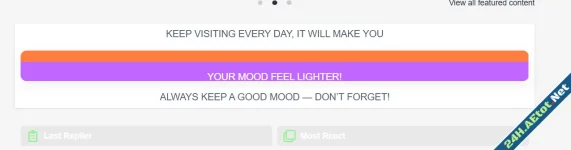
This guide adds stylish, animated "Neon Glow" notification cards to your XenForo 2.3 sidebar or homepage. It's perfect for highlighting announcements, server updates, or holiday greetings (like Christmas or New Year).
The code is optimized to fit any widget width automatically (sidebar or full width) without breaking your layout.
 Features
- Auto-Responsive: Fits perfectly in sidebars or above node lists.
- Smooth Animation: 4-color gradient borders chasing around the card.
- Lightweight: Pure CSS, no JavaScript required.
- Safe Layout: Uses overflow: hidden to ensure animations don't overlap other buttons.
 Installation Instructions
Step 1: Create a Widget
- Go to your Admin Control Panel (ACP).
- Navigate to Appearance → Widgets.
- Click Add widget.
- Select HTML from the dropdown menu.
- Widget key: neon_announcements (or any unique name).
- Title: Leave blank (or enter a title if you want a header above the cards).
- Display in positions: Choose where you want it (e.g., Forum list: Sidebar or Forum list: Above nodes).
Step 2: Paste the Code
Copy the following code entirely and paste it into the Template box:
CSS:
You must log in to view
(117 lines)
Step 3: Save & Enjoy
Click Save and verify the result on your forum homepage. Customization Tips
1. Changing the Background ColorFind .neon-box in the style section and change:
CSS:
You must log in to view
(1 lines)
2. Adjusting Animation Speed
To make the lights move faster, change 2s to 1s in the animation lines.
Example: animation: run-top 1s linear infinite;
3. Removing a Card
Simply delete the <div class="neon-box">...</div> block you don't need from the HTML part.


![[EF] Halloween Decor](/data/resource_icons/0/634.jpg?1761112560)

![[XB] XFRM: Purchasable Resources](/data/resource_icons/0/589.jpg?1760024912)
