
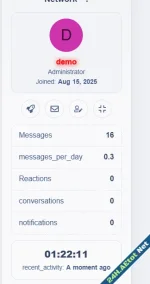

- Compatible with XF versions
- XF 2.2; 2.3
 Step 1: Import the Template
- Go to AdminCP → Appearance → Templates
- Create a new template called:
Code:
You must log in to view (1 lines) - Paste the contents of public_widget_aeWC.html
 Step 2: Add Styling
- Go to your Style → Templates → extra.less
- Paste the contents of extra_ae.less at the bottom
 Step 3: Create the Widget
- Go to AdminCP → Appearance → Widgets → Add widget
- Set:
- Type: HTML
- Widget key: ae_wc_widget
- Title: AE Welcome Card
- Positions: e.g. forum_list_sidebar (or any custom position)
- In widget content, insert:
Code:
You must log in to view
(1 lines)
Attachments





![[EF] Halloween Decor](/data/resource_icons/0/634.jpg?1761112560)

![[XB] XFRM: Purchasable Resources](/data/resource_icons/0/589.jpg?1760024912)
