

- Compatible with XF versions
- 2.2; 2.3
This isn't an easy option for XenForo. You can edit the email logo in the style property settings, but this only applies to Activity Summary Emails.
If you want your logo to appear in emails received for direct messages, you have no other setting that makes this possible.
Fortunately, we can edit templates.
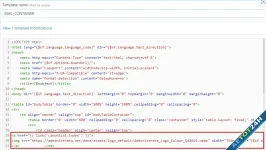
Go to Templates => MAIL_CONTAINER

Find the following lines: (should be on line 19)
Replace with
Change the width to which suits your logo, but recommended to be under 600px wide so it works nicely on all devices. Simple but effective.
If you want your logo to appear in emails received for direct messages, you have no other setting that makes this possible.
Fortunately, we can edit templates.
Go to Templates => MAIL_CONTAINER
Find the following lines: (should be on line 19)
CSS:
You must log in to view
(1 lines)
CSS:
You must log in to view
(3 lines)
Last edited:


![[EF] Halloween Decor](/data/resource_icons/0/634.jpg?1761112560)

![[XB] XFRM: Purchasable Resources](/data/resource_icons/0/589.jpg?1760024912)
