
avatar
-
Tutorial Remove User Avatar from Resource
before and after and code- Meta
- Thread
- avatar remove resource user
- Replies: 0
- Forum: Tips & Tutorials
-
Tutorial Flashing Online Offline Avatar Framework
Open the message_macros template for the theme you're using and find the following code:Replace it with the following code:Add the following code to your theme's extra.less template:- Meta
- Thread
- avatar offline online
- Replies: 0
- Forum: Tips & Tutorials
-

Premier Addons [XTR] Rich Username Plus 1.0.0
This add-on allows users to change the color of their own username. Check to user group permission after the installed. Account Details Now user can change own username color. Result Add-on batch installed/upgraded tested.- Meta
- Resource
- avatar
- Category: VIP ADDONS
-
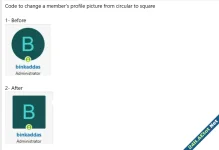
Makes avatar square
3- Add the below code to extra.less template- Meta
- Thread
- avatar
- Replies: 0
- Forum: Tips & Tutorials
-

Tutorial Add an icon next to the member's name
1- go to admin panel >> Group and licenses >> Registered 2- in the CSS Username Formatting add the below code ( you need to update the attached photo and change the link below )3- in the Extra.less Template add the below code here also more icons- Tinhte
- Thread
- avatar icons
- Replies: 1
- Forum: Tips & Tutorials
-
Premier Addons [TC] Avatar On Registration 1.1.0
The add-on adds the ability to set a user avatar during registration. Features: Setting an avatar at registration Requirement to set an avatar upon registration Options: /admin.php?options/groups/usersAndRegistration/#tc_aor- Meta
- Resource
- avatar registration
- Category: VIP ADDONS