
![[XR] Top Stories Pro for XenForo 2.3](/data/resource_icons/0/956.jpg?1781239189)

Meta
ADMINISTRATIVE
 Windows 10
 Microsoft Edge 149
- Compatible with XF versions
- Xf2.3
[XR] Top Stories Pro for XenForo 2.3
Turn your best forum content into a modern, engaging front-page experience.
Highlight what matters. Increase clicks. Keep members exploring longer.
Turn your best forum content into a modern, engaging front-page experience.
Highlight what matters. Increase clicks. Keep members exploring longer.
Make your community feel alive from the first second
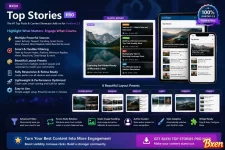
[XR] Top Stories Pro is a modern content showcase widget built for XenForo 2.3. It helps you display your most important, active, trending, or hand-picked discussions in a beautiful visual layout that instantly makes your forum look more active, more professional, and more valuable to visitors.
Instead of showing plain thread links, this add-on turns your best discussions into attractive story blocks with images, badges, author info, excerpts, stats, and responsive layouts.
If your forum has great content but visitors are not noticing it fast enough, this is the widget your homepage, forum index, category pages, and sidebars are missing.
Why your site needs this
 Your best content gets more visibility
Important threads should not disappear inside normal forum lists. Top Stories Pro brings them forward in a way that feels modern, editorial, and easy to explore.
Visitors understand your community fasterNew visitors can instantly see what your forum is about, what people are discussing, and which content is worth clicking.
Members stay longerBeautiful story cards encourage browsing. A strong visual layout naturally increases clicks, page views, and discussion discovery.
Your forum looks more premiumA clean content showcase gives your XenForo site a more professional, news-style, magazine-style, or community portal feel without changing your existing forum structure.
Easy to configure, powerful in real useCreate a widget, choose a layout, select a source mode, set your forums or manual thread IDs, and it is ready to display.
Beautiful layout presets included
 Classic Mosaic
A strong featured layout with one large story, supporting stories, author avatar support, badges, excerpts, and balanced card sizing. Perfect for a homepage or forum index highlight area.
MagazineAn editorial-style grid designed for category-based presentation. When multiple forum node IDs are configured, the widget can rotate content between nodes so each column feels more varied and balanced.
Hero + ListA large lead story with a clean list of supporting topics. Great for portals, landing pages, and content-heavy communities.
Modern CardsResponsive card blocks with images, titles, stats, and clean spacing. A flexible choice for many widget positions.
CinematicA wide visual presentation for sites that want a more dramatic, media-rich look.
CompactA sidebar-friendly layout for showing important stories without taking too much space.
Smart content source modes
 Latest activity
Show recently active discussions and keep the widget fresh automatically.
Newest threadsDisplay the newest topics from your selected forums.
TrendingPromote fast-rising topics using a freshness and engagement-based score.
Smart scoreBalance freshness, views, replies, and reactions to surface content that deserves attention.
Most viewedShow threads with the strongest view count.
Most repliedHighlight discussions with the most conversation.
Most reactedFeature content with strong first-post reaction performance.
Manual modeEnter specific thread IDs and display them in your own custom order. Perfect for announcements, campaigns, featured releases, sponsored content, or hand-curated editorial sections.
Image handling that makes your content stand out
Automatically extracts the first usable image from a thread post Supports image attachments and IMG BBCode Optional fallback image when a thread has no image Optional setting to skip threads without images Image density control: Compact, Balanced, or Immersive Clean cropping with modern responsive presentation Optimized visual consistency across layout presetsBuilt for real XenForo 2.3 styling
 Top Stories Pro is designed to adapt to your XenForo style instead of fighting it.
It uses XenForo 2.3 style-aware colors, typography behavior, spacing, borders, and responsive layout logic so the widget naturally fits light themes, dark themes, custom styles, and modern design variations.
That means less manual styling work and a better result across different communities.
Useful display details your visitors will notice
Story title Thread image Author name Author avatar in supported layouts Forum/node label Date View and reply stats Excerpt text NEW badge for fresh content HOT badge for active or high-engagement content Related threads in Magazine layout Widget title support from XenForo widget settingsPerfect for many site areas
 Forum homepage Category landing pages Portal pages Sidebar highlights Resource/community showcase areas News-style sections Product update sections Featured discussions Staff-picked content blocks High-value SEO landing pages
Why this add-on is different
Many widgets only show a simple list of threads. Top Stories Pro is built to create a real content experience.
It does not just show what is new. It helps you decide what deserves attention.
It does not just display posts. It turns discussions into story cards.
It does not force one design. It gives you multiple layout presets for different page positions.
It does not require constant manual work. Smart source modes can keep your showcase updated automatically.
Designed for admins who care about presentation and engagement
If you run a XenForo community, you already know that great content is only valuable when people actually see it.
Top Stories Pro helps you bring your strongest discussions to the surface, create a better first impression, and guide visitors into the topics that matter most.
Whether you run a tech forum, gaming community, resource marketplace, news community, niche forum, support site, or private member community, this add-on gives your content a stronger visual presence.
Quick setup
 Install the add-on Create a XenForo widget using XR Top Stories Choose your layout preset Select your source mode Enter forum node IDs or manual thread IDs if needed Configure image behavior and badges Place the widget where your visitors will see it Done
Give your forum content the spotlight it deserves
Your community already has valuable discussions. Top Stories Pro helps visitors find them faster, click them more often, and stay engaged longer.
Install [XR] Top Stories Pro today and turn your XenForo 2.3 forum into a more visual, more active, and more professional community experience.
Your best threads should not be hidden. Put them on display.

![[XR] Top Bar Pro](https://bxen.net/data/avatars/s/0/1.jpg)
![[OzzModz] Registration Spaminator Stop Spam Bot Registrations](https://bxen.net/data/attachments/1/1622-a9171af8d123a623b0c665e082ddeae3.jpg)